Removing Anonymous FTP access
Removing Anonymous FTP access is as simple as enabling the access. Removing access does not delete your public_ftp folder or its contents (you should not delete this folder anyway), but it does prevent anyone from accessing that folder
through FTP.
To remove Anonymous FTP access:
-
Click on the FTP Manager link in the Account Settings area.
-
Click on the  button.
-
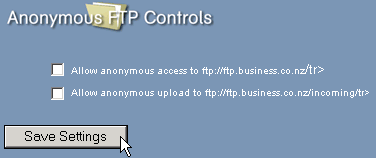
Remove the tick from the Allow anonymous access to ftp://ftp.yourdomain.com tick box or the Allow anonymous upload to ftp://ftp.yourdomain.com/incoming tick boxes.
-
Click on the  button.