Error Pages
 Error pages are served to Internet users when any one of a variety of errors occur, such as when a user enters an incorrect
URL or is not authorized to access a specific directory in your web site. Companies often customize error pages to brand them
with a specific corporate image and a link to their home page. You do not have to customize these pages - the error page is
always available, whether customized or not.
Error pages are served to Internet users when any one of a variety of errors occur, such as when a user enters an incorrect
URL or is not authorized to access a specific directory in your web site. Companies often customize error pages to brand them
with a specific corporate image and a link to their home page. You do not have to customize these pages - the error page is
always available, whether customized or not.
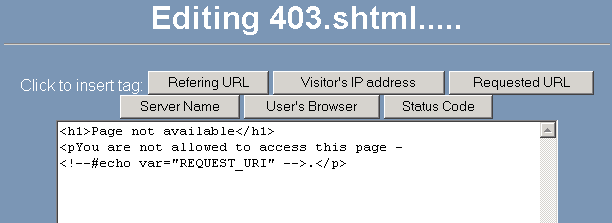
To create or modify a customized error page:
-
Click on the Error Pages link in the Account Settings area.
-
Click on the button of the required error page, such as the  button.
-
Enter the HTML code for the error page. You can use the buttons at the top of the page to insert variables into the displayed
code.
Example:
<h1>404 Not Found</h1>
<p>The requested page, <!--#echo var="REQUEST_URL" --> ,is not available.</p>
-
Click on the  button.